Get Started
Set up your Python environment to run the GJD use cases
Prerequisites
Before running any of the examples in this section, make sure you have the following software installed.
1. Python
You need Python 3.10 or higher.
- Download from python.org
- Verify your installation:
python --version2. Quarto (for site rendering)
Quarto is used to render the notebooks into the HTML site you are reading. If you only want to run the notebooks locally, you can skip this.
- Download from quarto.org
3. IDE (recommended)
| IDE | Notes |
|---|---|
| JupyterLab | Classic notebook experience |
| VS Code / Cursor | Install the Jupyter extension |
| Google Colab | Zero install — upload the .ipynb file |
Required Python Packages
Install all dependencies at once:
pip install requests pandas matplotlib plotlyOr using a requirements.txt (included in the Python/ folder):
pip install -r requirements.txtPackage overview
| Package | Purpose |
|---|---|
requests |
HTTP requests to the GJD API |
pandas |
Data manipulation and analysis |
matplotlib |
Static charts and visualizations |
plotly |
Interactive charts |
Clone the Repository
Clone the repository to get all the source files and run the examples locally:
# Clone via SSH
git clone git@github.com:EarthInnovationInsitutute/usecasegjd.git

# Or clone via HTTPS
git clone https://github.com/EarthInnovationInsitutute/usecasegjd.git
Configure Your API Key
All use cases require a GJD API key to authenticate requests. You must be registered on the Green Jurisdictions Database to obtain one.
1. Get your API key
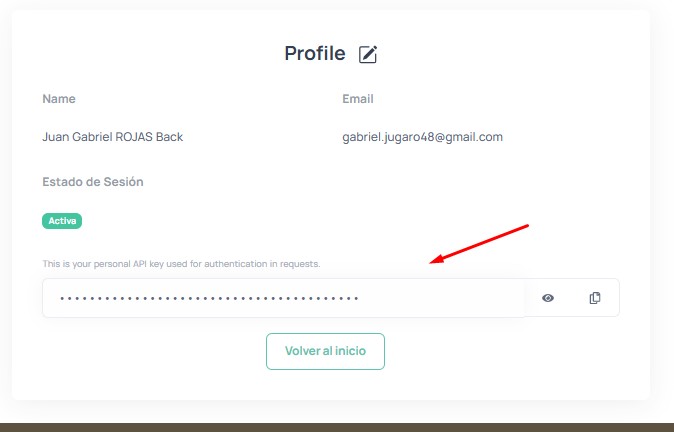
Log in to greenjurisdictions.org, go to your Profile page, and copy your API key:
2. Create the .env file
In the project root (the usecasegjd/ folder), create a file named .env with the following content:
GJD_API_KEY=your-api-key-hereYou can also create a .Renviron file (same format) — the notebooks will try to load both.
The .env and .Renviron files are listed in .gitignore and will not be pushed to the repository.
3. Using Google Colab?
If you’re running the notebooks in Google Colab, there are no local files available. Simply uncomment and set the API key directly in the first code cell:
API_KEY = "your-api-key-here"Render the Python Section
Once cloned and configured, render the Python section:
cd usecasegjd/Python
quarto render
Run a single notebook
quarto render uc01-forest-cover-caqueta.ipynbLive preview
quarto previewNext Steps
Head to API Authentication to learn more about how the API works, then explore the use cases.