Get Started
Everything you need to run the WebApp use cases.
Clone the Repository
This project is an open-source repository hosted on GitHub. Clone it to get all the source files and run the examples locally:
SSH
git clone git@github.com:EarthInnovationInsitutute/usecasegjd.gitHTTPS
git clone https://github.com/EarthInnovationInsitutute/usecasegjd.gitConfigure Your API Key
All use cases require a GJD API key to authenticate requests. You must be registered on the Green Jurisdictions Database to obtain one.
1. Get your API key
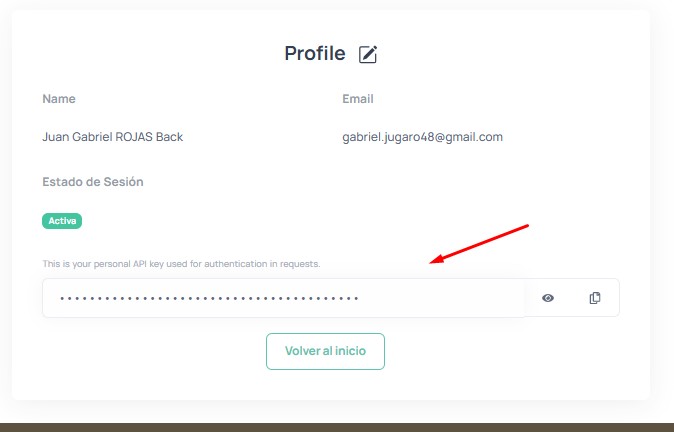
Log in to greenjurisdictions.org/profile, and copy your API key from the profile page:
2. Create the .Renviron file
In the project root (usecasegjd/), create a file named .Renviron with the following content:
GJD_API_KEY=your-api-key-hereYou can use the included template: cp .Renviron.example .Renviron
.Renviron file is listed in .gitignore and will not be pushed to the repository.
Prerequisites
The great thing about this section is that you need almost nothing installed. Everything runs in the browser.
1. A Modern Browser
Chrome, Firefox, Edge, or Safari. That's it.
2. A Text Editor (optional)
If you want to modify the examples: VS Code, Cursor, Sublime Text, or any editor.
3. A Local Server (optional)
You can open the HTML files directly, but some browsers block fetch() from local files. A simple static server solves this:
Python
cd usecasegjd/WebApp
python -m http.server 8080
Node.js
npx serve usecasegjd/WebAppWAMP / XAMPP / MAMP
Place the repo in your www folder and navigate to http://localhost/usecasegjd/WebApp/.
Libraries Used (via CDN)
No npm install needed. All libraries are loaded from CDN:
| Library | CDN |
|---|---|
| Bootstrap 5.3 | cdn.jsdelivr.net/npm/bootstrap@5.3.3 |
| Highcharts 11 | code.highcharts.com/11 |
Next Steps
Head to API Authentication to set up your API key.