required_packages <- c(
  "httr2",      # HTTP requests to the GJD API
  "jsonlite",   # JSON parsing
  "dplyr",      # Data manipulation
  "tidyr",      # Data tidying
  "ggplot2",    # Data visualization
  "DT",         # Interactive tables
  "readr"       # Reading CSV / tabular data
)

install.packages(required_packages)Get Started
Set up your environment to run the GJD R use cases
Prerequisites
Before running any of the examples in this section, make sure you have the following software installed on your machine.
1. R
You need R version 4.3 or higher.
- Download from CRAN
- Verify your installation by running in a terminal:
R --version2. Quarto
Quarto is used to render the .qmd notebooks into HTML.
- Download from quarto.org
- Verify your installation:
quarto --version3. IDE (recommended)
Any of the following will work well:
| IDE | Notes |
|---|---|
| RStudio | Quarto support built-in |
| VS Code / Cursor | Install the Quarto extension |
Required R Packages
The use cases in this section rely on a set of common R packages. Install them all at once by running the following in your R console:
You can verify that all packages load correctly:
lapply(required_packages, library, character.only = TRUE)Clone the Repository
Clone the repository to get all the source files and run the examples locally:
# Clone via SSH
git clone git@github.com:EarthInnovationInsitutute/usecasegjd.git

# Or clone via HTTPS
git clone https://github.com/EarthInnovationInsitutute/usecasegjd.git
Configure Your API Key
All use cases require a GJD API key to authenticate requests. You must be registered on the Green Jurisdictions Database to obtain one.
1. Get your API key
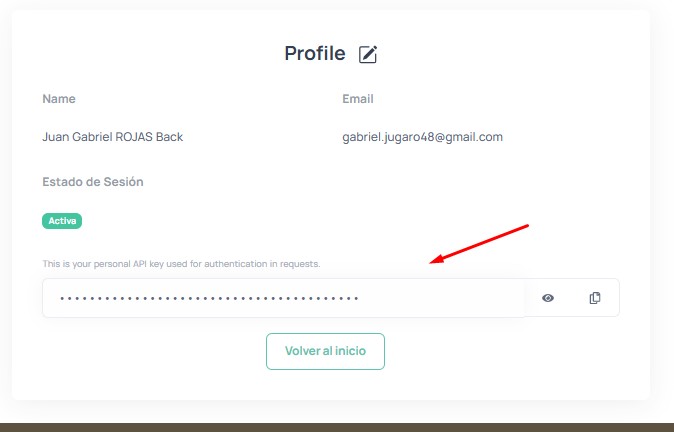
Log in to greenjurisdictions.org, go to your Profile page, and copy your API key:
2. Create the .Renviron file
In the project root (the usecasegjd/ folder), create a file named .Renviron with the following content:
GJD_API_KEY=your-api-key-hereYou can use the included template as a starting point:
cp .Renviron.example .RenvironThen edit .Renviron and replace your-api-key-here with the key from your profile.
WarningNever commit your API key
The .Renviron file is listed in .gitignore and will not be pushed to the repository. Only .Renviron.example (without a real key) is tracked by Git.
Render the R Section
Once cloned and configured, render the R section:
cd usecasegjd/R
quarto render
This will generate all HTML files from the .qmd notebooks. Open index.html in your browser to explore the results.
Render a single use case
quarto render my-use-case.qmdLive preview while editing
quarto previewThis starts a local server and automatically refreshes the page when you save changes to any .qmd file.
Next Steps
You’re all set! Head to the Use Cases section in the sidebar to start exploring examples.